
2023/7/19大约 2 分钟
Vuex
快速入门
在使用vue-cil构建vue项目的时候就可以选择vuex进行安装
安装结束后会创建如下目录
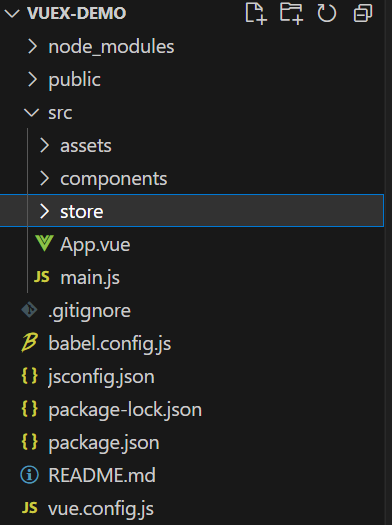
然后store文件中我们在state中加上
import Vue from 'vue'
import Vuex from 'vuex'

Vue.use(Vuex)

export default new Vuex.Store({
  state: {
    count:0
  },
  getters: {
  },
  mutations: {
  },
  actions: {
  },
  modules: {
  }
})
在App.vue中调用
    {{$store.state.count}}

import HelloWorld from './components/HelloWorld.vue'

export default {
  name: 'App',
  components: {
    HelloWorld
  }
}

#app {
  font-family: Avenir, Helvetica, Arial, sans-serif;
  -webkit-font-smoothing: antialiased;
  -moz-osx-font-smoothing: grayscale;
  text-align: center;
  color: #2c3e50;
  margin-top: 60px;
}
然后浏览器会显示出count的值,我们借助vuedevtools也能看到
State
State就是存储公共数据源,所有数据都要统一放到这
如何访问?
第一种方式
this.#store.state.全局数据名称
第二种方式
import { mapState } from 'vuex'
``` 通过导入的mapState,将当前组件所需的全局数据,映射为当前组件的computed计算属性
Mutation
Mutation主要用于修改store中给的数据
- 只能通过mutation变更store数据,不可以直接操作store中的数据
- 繁琐,但主要用于集中监控所有数据变化
触发mutations的第一种方式
this.$store.commit('函数名')具体实现:
import Vue from 'vue'
import Vuex from 'vuex'

Vue.use(Vuex)

export default new Vuex.Store({
  state: {
    count:0
  },
  getters: {
  },
  mutations: {
    add(state){
      state.count++
    }
  },
  actions: {
  },
  modules: {
  }
})
    state:{{count}}
    加一

import {mapState} from 'vuex'
export default {
  name: 'App',
  components: {

  },
  computed:{
    ...mapState(['count'])
  },
  methods: {
    changeState() {
      this.$store.commit('add')
    },
  },
}

#app {
  font-family: Avenir, Helvetica, Arial, sans-serif;
  -webkit-font-smoothing: antialiased;
  -moz-osx-font-smoothing: grayscale;
  text-align: center;
  color: #2c3e50;
  margin-top: 60px;
}
只有mutations里的函数才有权利修改state中的函数
commit中的第二个参数可以传递参数给mutations
第二种方式:
import {mapMutations} from 'vuex'methods:{
...mapMutations(['add'])
}Action
Action用于处理异步任务
如果通过异步操作变更数据,必需通过Action,而不能使用Mutation,但是在Action中还是要通过触发Mutation的方式间接变更数据
actions:{
    addAsync(context){
        setTimeout(()=>{
            context.commit('add')
        },1000)
    }
}
触发actions:
this.$store.dispatch('addAsync')如果是携带参数也就是在函数后面再加个参数即可
第二种使用方式:
import {mapActions} from 'vuex'在methods中映射
...mapActions(['addAsync'])
    state:{{count}}
    加一

import {mapState,mapActions} from 'vuex'
export default {
  name: 'App',
  components: {

  },
  computed:{
    ...mapState(['count'])
  },
  methods: {

    ...mapActions(['addAsync'])

  },
}

#app {
  font-family: Avenir, Helvetica, Arial, sans-serif;
  -webkit-font-smoothing: antialiased;
  -moz-osx-font-smoothing: grayscale;
  text-align: center;
  color: #2c3e50;
  margin-top: 60px;
}
Getter
计算属性
使用getters的第一种方式:
this.$store.getters.名称使用getters的第二种方式:
import {mapGetters} from 'vuex'
computed:{
    ...mapGetters({'showNum'})
}